
Honest to Goodness, a Mushiny customer, stores 20 kg bags of oats and tubs of peanut butter in the same operation as small single-serve bags. That is the kind of range most automation systems are quietly built to avoid. The small, light, uniform end suits a tote and a robot. The heavy, bulky end usually stays on a manual line.
When that happens you run two operations side by side. One is automated and one is not, and you pay for both. This article is about how to avoid that. Mushiny's shelf-to-person system, its tote systems and its pallet handling cover the large majority of a typical range between them, and together they can take anything that fits on an Australian pallet. The sections below give the actual size and weight limits, and say plainly what still does not automate.
Why do most automation systems only cover the easy SKUs?
Most systems are designed around one container: a tote of a fixed size, a carton of a fixed size, or a pocket on a sorter. Whatever fits the container gets automated, and the rest of the range becomes somebody else's problem.
The easy end is easy for a reason. Small, light items are cheap to move, quick to pick and predictable to store. They are also often the fastest movers by line count, so a business case built on them looks good.
The trouble shows up afterwards. The awkward SKUs are still there. They still need storing, picking and replenishing, and now they need their own staff, their own process and their own place in the building. You have automated the part of the range that was already cheapest to run by hand, and the expensive part is untouched.
What does a split operation cost you?
The cost is not only the manual labour that stays. It comes from running two operations at once.
- Two pick processes. An order that contains an easy line and an awkward line has to be picked in two places and brought together.
- Two sets of people. The automated side needs operators at stations. The manual side needs pickers who still walk. Mushiny's shelf-to-person page puts non-productive walking at about half of a picker's time in a manual warehouse, and that walking does not go away for the SKUs you left out.
- Floor you cannot reclaim. The manual zone keeps its aisles, so the space saving you modelled is smaller than the one you get.
Partial automation is not wrong, but the leftover portion should be a decision you made with the numbers.
Which Mushiny system takes which part of the range?
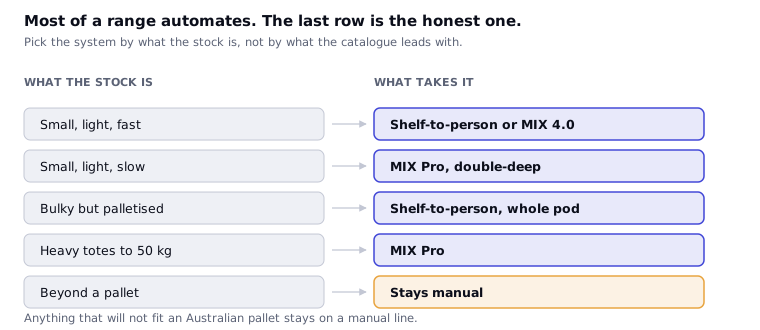
This table maps the characteristics of a SKU to the system that takes it. Every size and weight comes from that system's own specification.
| Range characteristic | System | What it takes |
|---|---|---|
| Small, light, high-count items | MIX 4.0 | Totes 600 x 400 x 300 mm, up to 30 kg per tote, 60 totes per shelf (customisable), presented at up to 240 totes an hour per workstation |
| Heavy items in totes | MIX Pro | Totes 600 x 400 mm with customisable height, up to 50 kg per tote, in racking up to 12 m high |
| Bulky and small items together | Shelf-to-person pods | Pods up to 2.7 m tall holding small and bulky items in the same system, picked as whole shelf, case or item |
| Whole pallets | Shelf-to-person, MIX 4.0, MIX Pro | Shelf-to-person picks whole pallets. MIX 4.0 stores and picks pallets, shelf pods and totes in one system. The MIX Pro workstation also picks from Pallet-POD |
| Cartons and trays of variable size | MIX Pro | A flexible gripper stores cartons, totes or trays of variable footprints in the racking |
| Fast movers | MIX 4.0 | 36 buffer locations per workstation hold hot items beside the picker, and manual shelves for fast-moving or bulky lines can be added to the grid |
| Batch-picked units to sort into orders | Minisorter | 50 x 50 x 5 mm up to 750 x 500 x 250 mm depending on size class, 0.02 to 10 kg (small class to 5 kg) |
| Batch-picked units, higher volume | 3D Sorter MAX | 50 x 50 x 1 mm up to 450 x 320 x 320 mm, 0.02 to 7 kg |
| Bagging and labelling | PolyPacker | Bags 200 to 800 mm long and 200 to 600 mm wide, objects up to 200 mm thick |
Read the table by column, not by row. No single system takes every row, and that is the point. A range is covered by combining systems.
The weight spread shows it. The sorters stop at 7 kg and 10 kg. MIX 4.0 totes carry 30 kg. MIX Pro totes carry 50 kg. Shelf-to-person pods carry bulky stock, and whole pallets sit beyond the totes. A 20 kg bag is inside the tote load of both MIX systems, although whether a given bag fits a given tote depends on its dimensions.
How does Honest to Goodness run its range?
Honest to Goodness stores 20 kg bags of oats and tubs of peanut butter alongside small single-serve bags. That is the description Mushiny has for the site, and this section stays inside it.
Look at what that spread does to a system built around one container. A single-serve bag is small and light. A 20 kg bag of oats is neither. If the automation took only the single-serve end, the oats and the peanut butter would be picked by hand, and a good share of the building's work would still be walking and lifting.
The pieces in the table above do different jobs. Heavy and bulky lines can be held in shelf pods or in tote systems rated for the load. Small lines go in totes at density. Both can be picked at stations instead of by someone walking the aisles. The result is one operation instead of two.
This article gives no fleet, rate or layout figures for the site, because none have been supplied and checked. To see what a running site looks like, the reference sites page lists Australian sites with their published fleet and pod counts.
How much of a range can you automate?
Our range automates the large majority of a typical range. We do not put a single percentage on it, because the answer depends on your range and a headline figure would not survive a look at your item master.
To find the number for your site, take your item master and run each line against the envelopes in the table. Size and weight put a line in or out. That gives you a share by SKU count and a share by volume, and the two can be very different. A range where 95 per cent of lines fit but the other 5 per cent hold most of the cube is a different project from the reverse.
What still does not automate?
Some things stay manual, and an article that said otherwise would not be believable.
Anything bigger than a pallet. The ceiling for the range is what fits on an Australian pallet. Freight beyond that stays outside the system.
Stock that cannot be held safely. Pods, totes and grippers need something stable to hold. Product that cannot be contained, stacked or lifted without damage needs a manual process, or repackaging before it enters the system.
Heavy items on the sorters. The Minisorter stops at 10 kg and the 3D Sorter MAX at 7 kg. A heavy line can be stored and picked automatically and still skip the sortation step.
Items outside the tote load. A tote carries 30 kg in MIX 4.0 and 50 kg in MIX Pro. A line heavier than that has to go in a pod or on a pallet, or stay out.
Heavy items on a pod. Pod weight is set by the robot under it. A T6-800 lifts up to 800 kg and a T6-1500 up to 1,500 kg, so the pod limit is a fleet choice rather than a fixed ceiling.
Long items. Length is limited to a standard Australian pallet, 1,165 mm square. Anything longer than that stays manual. If a line of yours sits near the edge, bring the product to the Chatswood Tech Centre and we will run it.
The sensible target is not 100 per cent. It is a leftover portion small enough, and clearly enough defined, that you can leave it manual on purpose.
How do you test your own range?
Take your item master and work through six steps.
- Get length, width, height and weight for every active SKU. Missing dimensions are the usual reason this exercise stalls.
- Check each line against the tote and pod envelopes. A line over 30 kg per tote is a MIX Pro or pod candidate. A line over 50 kg needs a different answer.
- Mark which lines go through sortation. Check them against 10 kg and 7 kg, and against the size limits on the Minisorter and the MAX.
- Count by lines and by cube. The share of lines automated and the share of volume automated are different numbers, and the second is usually the one that sets your labour saving.
- Look at the leftover lines. Are they slow, few and awkward, or are they a large share of the volume? The first is acceptable. The second means the project needs a different shape.
- Check velocity. Fast movers belong close to the picker. Slow movers can live deeper in the system.
Bring the result to the Chatswood Tech Centre. It is the only place in Australia with Mushiny's full range running live under one roof, and it is free to visit.
Frequently asked questions
Can warehouse automation handle heavy and bulky products?
Yes, within published limits. Mushiny's MIX 4.0 totes carry up to 30 kg and MIX Pro totes carry up to 50 kg. Shelf-to-person pods hold small and bulky items in the same system, and the system can pick whole pallets. Items larger than an Australian pallet stay outside it.
What is the heaviest item a Mushiny system can handle?
It depends on the system. A MIX Pro tote carries up to 50 kg and a MIX 4.0 tote up to 30 kg. For sortation, the Minisorter takes items up to 10 kg and the 3D Sorter MAX up to 7 kg. Whole pallets are handled by shelf-to-person, MIX 4.0 and MIX Pro, and the right system depends on the pallet and your profile.
Do I need separate systems for small and large SKUs?
Usually you use more than one system, but they work together in one building. A site might hold small lines in totes, bulky lines in shelf pods and pallets as pallets, then add a sorter for batch-picked orders. Mushiny sizes those parts together so they do not become separate operations.
What percentage of my range can be automated?
Mushiny's position is that the large majority of a typical range can be automated. The exact share for your site depends on your item sizes, weights and velocity, so Mushiny measures it from your item master rather than quoting a general figure.
What stays manual after automation?
Anything larger than an Australian pallet, stock that cannot be held safely in a pod, tote or gripper, and heavy lines that fall outside the sorter limits of 10 kg and 7 kg. Heavy lines can still be stored and picked automatically while skipping the sortation step.
Is automation worth it if only part of my range suits?
Often yes, but it depends on what is left over. If the leftover lines are few and slow, a small manual zone is a reasonable trade. If they are most of your volume, the project should start somewhere else or use a different mix of systems. Bring your item master and Mushiny will tell you which case you have.
Bring your numbers
Send your order lines and your product dimensions to our engineers. We will work the maths out for you and give you the benefits case laid over your whole operation.
Talk to us →